RadiationExplorer
An Unreal Engine plugin for scientific visualization and analysis of volumetric radiation data — VTK simulations to interactive isocontours via ParaView, with a managed-pair data-source system, accumulated-dose integrator pattern.
Active·since — views
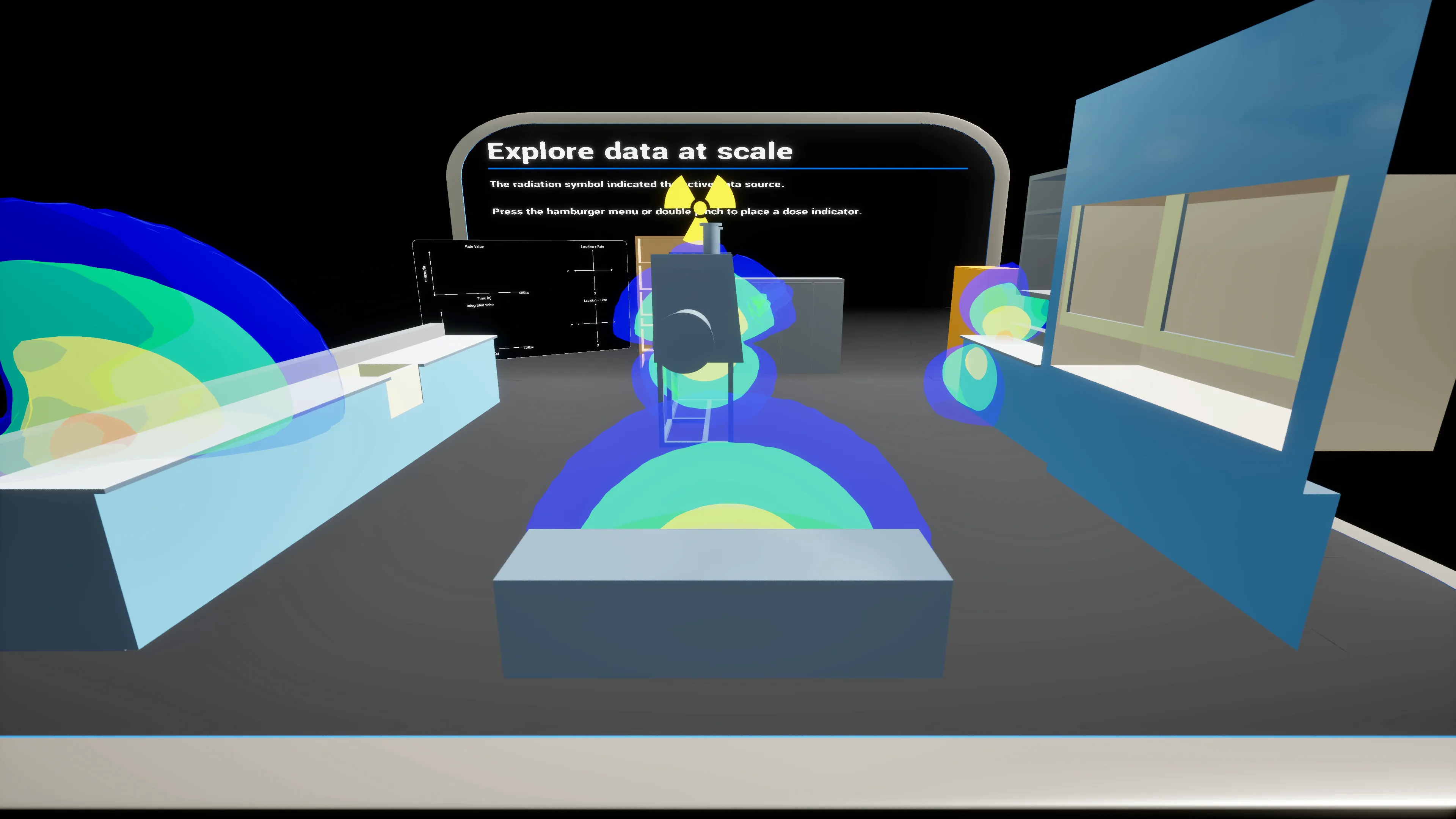
What it is. An Unreal Engine plugin for scientific visualization and analysis of radiation data — load volumetric simulation output, interpolate values at arbitrary points, and render isocontours and particle visualizations in a real-time 3D environment. Applications: radiation-safety analysis, nuclear-engineering simulations, scientific research, and AR/MR walkthroughs of dose fields.
Why. Radiation transport simulations produce dense scalar/vector fields that are hard to interpret without being inside them. Standard desktop tools (ParaView, VisIt) show the field; an Unreal-based viewer lets you walk through it, measure accumulated dose along a path, and explore design alternatives interactively, including in XR.
Lineage: VIPER → RadiationExplorer
RadiationExplorer is the production descendant of VIPER (Virtual Interaction with Physics Enhanced Reality), the earlier AR-based system for visualizing ionizing radiation data. VIPER was presented at the ANS 2022 Annual Meeting (DOI 10.13182/T126-37927) and is the subject of US patent applications 63/438,888 and 18/134,649 (2023), held by UT-Battelle (Oak Ridge National Laboratory). Scott Greenwood is a named inventor on both.
How it ingests data
The data pipeline is a three-step VTK → ParaView → Unreal flow, with a batch workflow that runs the whole thing in one call:
| Step | What | How |
|---|---|---|
| 1. File structure | organize raw VTK files into a folder hierarchy keyed by location | python pipeline_helper_createFileStructure.py |
| 2. Isocontours | generate .obj isocontour meshes from each VTK via ParaView |
pvpython.exe pipeline_helper_createIsocontours.py |
| 3. Load to UE | import the generated assets into Unreal | py pipeline_helper_loadData.py (run from the UE editor) |
| all three | batch workflow | py pipeline_batch_workflow.py |
A globalCoordinates.csv maps each simulation origin to the Unreal
world origin, so multi-source scenes line up correctly. Two folder
conventions are supported: flat (one location) and nested (per-location
subfolders). Coarse “pawn” grids — for whole-person dose estimates —
can sit alongside fine grids used purely for visual meshes.
Two visualization approaches
Group Visuals — process a structured set of VTKs through the
workflow editor function to auto-create base contours, then drop a
BP_GroupIsocontourVisualizer referencing the group. Best for static
radiation fields you want to show.
Data Visuals — drop a data-source interpolator actor into the
scene with the right properties, then add a Blueprint deriving from
A_DSI_Accessor to query the interpolated field at any point. Best for
visuals or other actors that react to the data — dose-rate readouts,
moving sensors, dynamic alarms.
Data Source Manager
A managed-pair system for assembling data + visual pairs in a scene
without hand-wiring each one. One BP_DataSourceManager in the level
(singleton); on actors that need data exposure, add an
AC_ManagedDataSource component, point it at a config row name (e.g.
"Corner", "Center"), and on Play the pair spawns automatically and
attaches to the owner.
| Capability | API |
|---|---|
| Component-side control | Enable() · Disable() · SetEnabled(bool) · GetPair() |
| Manager-side bulk control | EnableAll() · DisableAll() · EnableByRowName("Corner") · DisableByRowName("Center") · GetAllPairs() · GetAllEnabledPairs() |
| Dynamic registration | Register() · Deregister() · RegisterIntegratorActor(actor) · DeregisterIntegratorActor(actor) |
Integrator actors sample every registered data source via an
AC_PointInterpolator (one per source) and accumulate dose and dose
rate in real time. Concretely: a Pawn walking through the scene
carries an integrator; the manager wires it to every active source; the
Pawn always knows its accumulated exposure.
Three canonical workflows:
- Static scene — components placed at edit time; pairs spawn on Play.
- Step-by-step reveal — components start disabled; gameplay calls
Enable()to progressively unfold the visualization. - Dynamic spawning — spawn an actor at runtime, add the component
via Blueprint, call
Register()— the pair appears without a pre-existing slot.