DataPipeline
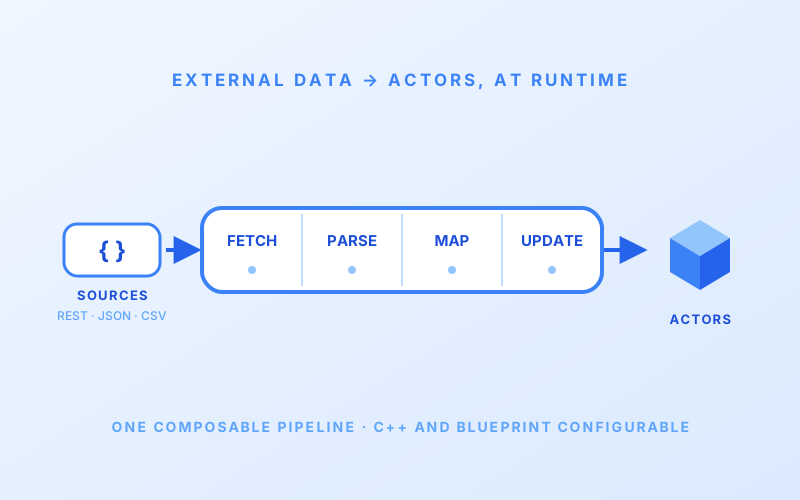
A modular Unreal Engine plugin for fetching, parsing, and routing external data to actors at runtime — REST APIs, files, JSON, CSV, all on one composable four-stage pipeline. Ships with a Flask test server that simulates Cray-style HPC telemetry.
Active·since — views
 |
|---|
| Connect external data to actor logic using DataPipeline Plugin |
What it is. An Unreal Engine plugin that fetches external data, parses it, maps it to actors, and updates them at runtime — all through a single composable pipeline you configure with components in the editor. DataPipeline brings the live data to the things in the scene and is application agnostic, so let your creativity run wild!*
Why. Every interactive Unreal app eventually needs to talk to something outside itself — a REST endpoint, a CSV log, a telemetry feed. The recurring pattern is “fetch a thing, parse a thing, find the actor that cares about a key in the thing, update a property.” DataPipeline is that recurring pattern factored into a four-stage pipeline so you configure it once and forget it.
The four-stage pipeline
| Stage | Role | Modules |
|---|---|---|
| Transport | fetch raw data | UHttpTransport (REST with Bearer / Basic / API Key) · UFileTransport (local files, auto-detects text vs binary) |
| Schema | parse string → typed records | UJsonSchema (nested paths, field mappings, transforms) · UTextSchema (CSV / TSV / key-value) |
| Resolver | match each record to actors | UDirectResolver (exact / wildcard / prefix / suffix / contains pattern matching) · UActorIDResolver (match by ID) · UDataResolverManager (coordinate multiple resolvers) |
| Update Strategy | send the typed value | UInterfaceUpdate (calls IDataPipelineInterface on the matched actor — single or batched) |
A pipeline is built by dropping a UDataPipelineManager component on
any actor and assigning one module per stage. Run it in Manual mode
(call FetchOnce() when you want) or Polling mode (automatic
interval). Mix and match — the schema doesn’t know which transport is
upstream, the resolver doesn’t know which schema produced it.
On the receiving end
Target actors implement IDataPipelineInterface and react to the
mapping:
void AMyActor::ReceiveUpdateMapping_Implementation(const FPropertyActorMapping& Mapping)
{
    if (Mapping.PropertyKey == "temperature")
    {
        Temperature = Mapping.Value.ToNumber();
    }
}
A realistic test rig in the box
DataPipeline ships with a Flask-based HTTP test server under
ExternalAssets/scripts/ that generates synthetic HPC telemetry —
nodes, chassis, cabinets — using Cray-style xnames (the hardware
naming convention used in HPE Cray supercomputers like ORNL’s Frontier).
It exposes /api/nodes, /api/chassis, /api/cabinets, and
/api/hierarchy endpoints you can wire a UHttpTransport at.
A driver script orchestrates server + polling + snapshot/streaming capture, so you can prove a pipeline end-to-end with realistic high-performance-computing data shapes before pointing it at a real telemetry source.
Example payloads are committed under ExternalAssets/exampleData/ in
four formats — JSON, CSV, key-value, regex-style text — so each schema
has a reference input to test against.
Extending
Each stage parents a U… base class — UTransport, USchema,
UResolver, UUpdateStrategy. Need GraphQL? Subclass UTransport. Need
protobuf? Subclass USchema. The plugin’s abstraction shape doesn’t
change; the rest of the pipeline composes around the new module.